Friday, September 17, 2021

Download SamFirm_Tool_A.I.O_v1.6.4 Free FRP AIO Remove Tool 2021

 Download SamFirm_Tool_A.I.O_v1.6.4 Free FRP AIO Remove Tool 2021


 password 
All FRP BYPASS 2021


SamFirm Tool is a small Utility program that you can use to download Samsung and Apple Firmware, Flash tools, ADB File, Sboot file, Also it helps to Bypass FRP in MTP mode from Samsung phones. If you have a phone with FRP lock message, then follow these simple steps and download SamFirm FRP AIO Tool v1.6.4

You can use SamFirm Tool to Open YouTube, Maps, Also helps to Open Galaxy Store to download GS Settings, access smart Switch, set Samsung Pass, open Settings, Samsung My files, and file commander remotely. The procedure is pretty simple, just connect your device to a wifi network and run the tool and choose the option that you want, Click MTP Bypass FRP, That’s it.

Google provides the new FRP feature on Android Lollipop, Marshmallow, Nougat, Pie, Oreo, and 10 Q versions. The summarization of factory reset protection is FRP and it basically protects Android users’ personal data and Privacy during thefts. The process of unlocking FRP security has different with every new Android version and phone. So, always remember the Gmail account information to avoid FRP protection lock.

The FRP turns On automatically when you have setup a Google Account on your Samsung Phone. After Reset your phone without removing the Google Account, you have to log in with the same Google ID and  that you set up earlier on the device to bypass Google account verification lock on your Samsung phone.

In case, your device stuck at the FRP lock verification screen and you have forgotten the account information, Then these simple step-by-step instructions will help you to bypass google account lock from your device.

Disable the Antivirus Protection first, otherwise, you will not be able to use this SamFirm FRP Tool V1.6.4

Read More: Samsung FRP Tool – Best FRP Tool to unlock Any Samsung phone

Download SamFirm FRP Tool Latest V1.6.4 (All Version)

Here, you will get the direct download link to download the SamFirm FRP Unlock Tool V1.4.3 all other versions easily, Also make sure to install the Samsung USB Driver on your computer.

SamFirm AIO Tool V1.5.3 is only free for 1 Week. You have to purchase full activation to use it further. Else, use SamFirm FRP V1.6.4 Tool for Free.

File Name: SamFirm_FRP_Tool_V1.6.4 (Free).zip
Size: 400MB
Type: .exe
Compatible OS: Windows 7, Windows 8, Windows 10 with 32&64bit
Developer: Mahmoud Salah
Download: SamFirm Tool v1.6.4 (Gdrive) (Latest Version)

File Name: SamFirm_FRP_Tool_V1.5.4.zip
Size: 130MB
Type: .exe
Compatible OS: Windows 7, Windows 8, Windows 10 with 32&64bit
Developer: Mahmoud Salah
Download: SamFirm Tool v1.5.4 (Mega) (Mirror)

All Old Versions details:

(Old)SamFirm_FRP_Tool_V1.4.3.zipDownload
SamFirm_Tool_AIO v1.5.3 (Old)Download
SamFirm_Tool_AIO v1.4.2 (Old)Download
SamFirm_Tool_AIO v1.4.1 (Old)Download
SamFirm_Tool_AIO v1.4.0 (Old)Download
SamFirm_Tool_AIO v1.3.3 (Old)Download
SamFirm_Tool_AIO v1.3.2 (Old)Download
SamFirm_Tool_AIO v1.3.1 (Old)Download

How to use SamFirm FRP AIO Tool V1.6.4

  • Download & Unzip the SamFirm FRP Unlock Tool V1.6.4 on your PC.
  • Run the SamFirm.exe
  • Now you will get the below-listed options to fix your phone.


Qualcomm Samsung FRP One Click Tool 2021 Download

 Qualcomm Samsung FRP One Click Tool 2021 Download


Qualcomm Samsung FRP One Click Tool 2021 Download. Samsung FRP tool 2021, For all Samsung FRP bypass tool latest update 2021. All Samsung FRP unlock tool 2022, How to Samsung FRP bypass. All Samsung FRP bypass in 1 click, And all Samsung FRP bypass in 1 click tool, Samsung, Qualcomm, FRP tool.

 Download Link:- Link

For all Samsung FRP bypass tools. Samsung FRP Tool, all Samsung FRP bypass one-click tool 2021, Samsung FRP unlock tool 2021, all Samsung FRP bypass latest 2021, Xiaomi mi account unlocks tool 2021, Qualcomm FRP unlocks tool 2021, all Samsung FRP tools.

what is the Qualcomm Samsung FRP One Click Tool and how to download

Samsung FRP One Click Tool 2021

This blog all time provides us latest and updates with all kinds of tools from Khulna. Qualcomm Samsung at Fifty One-Click Tools 2021 Tools This is a 100% tested software, a tool for all types of Android smartphones to solve all kinds of internal software problems. This blog also has all kinds of tools for numerous Android phones, tools can be used with a clear idea of ​​the issues related to the tools before using each tool.

 This tool is a comfortable tool for Samsung update phones, there are also different tools for Samsung, Oppo, Vivo, and all the more sophisticated phones that can be downloaded. Attempts have been made to discuss every aspect of the use of the tool through video tutorials. For the benefit of each visitor.

Using the Qualcomm Samsung FRP One Click Tool 2021. The screen lock and Frp lock of each, phone. Can be removed with a single click. Unfortunately for those phones whose screen lock or FRB lock cannot be set up manually, using this tool can make it easier to reset. We use each tool ourselves first and then upload the tools after making sure the tools are 100% tested.

Qualcomm Samsung FRP One Click Tool has the latest updates and sophisticated features added. In the case of Samsung phones, it makes it easy to remove everything with one click in download mode. The tool also includes full support for low CPO calls.

Supported Models:-

SM-A115F, SM-A115M, SM-A115U1.

SM-M115F, SM-A705F, SM-A015A.

SM-A015AZ,SM-A015F,SM-A015G.

SM-A015M, SM-A015T, SM-A015T1.

SM-A015U, SM-A015U1, SM-A015V.

SM-A025F, SM-A025G, SM-A025M.

File Name:-  Qualcomm Samsung FRP One Click Tool 2021 - 2021

File Size:- 24MB

Virus status:- scanned by Avast security

Download Link:- Link

Special Precautions and Warnings:-

Do not use any duplicate and modified applications, as modified applications may be infected with the virus. So we never support the use of modified software.

Find out the correct solution internally of the phone before repairing every mobile phone.

Android smartphones must have an internal backup before removing the screen lock, and a firmware update. This is because firmware updates are likely to delete all the information needed in the internal memory. So first you need to back up the phone, in that case, you can install the necessary applications a second time. For those properties that have internal memory, it is not possible to back them up. Format or firmware can be updated without any backup.

Why is FRP lock used?

Google accounts are used for Android smartphones because each phone downloads application software and files from the Play Store or App Store. In that case, permission is required to download the file or download the application. Permission is obtained by using a Gmail account or email as permission.

Unfortunately, if the phone is hacked manually, the FRP has to be reset in case of reset. In most cases, it is not possible to log in to a Google account because unfortunately forgetting the account makes it impossible to log in to those products.

Most of the time we forget to leave our Android smartphone here and there, or unfortunately, our phone is lost, sometimes when we lose our phone we use FRP Security Lock so we can see where we are. Because we have a Google account logged in to our phone, by searching Find My Phone from any Android phone or computer through the browser, we can see the exact address of the lost sister by logging in to that account of the lost phone.

How to download and how to use these tools?

This application can be downloaded from the article's download link. In that case, the issues related to download have been highlighted through the discussion. Once the application is downloaded, unzip the zip file on the desktop on the laptop or computer.

The application is a comfortable application for computers and laptops, the application is used for repair work, this application is the latest and sophisticated mobile repairing application.

Tools More Info:- 

Install the software zip file, once the application is fully installed, you have to launch the application first to use the application. This app can be used effortlessly in case of phone screen lock FRP lock removal, discussions have been highlighted to give a clear idea through the discussion.


Thursday, September 16, 2021

All MKQC V2 Tool Oppo Realme Pattern Password Unlock Tool | Samsung Vivo Huawei Xiaomi | Frp Mi Account Tool 2021


All MKQC V2 Tool Oppo Realme Pattern Password Unlock Tool


 File Name: Vivo Unlock Tool
File type: compressed/Zip
[Use 7zip or Winrar To Unzip File]
File PassWord:  Free Without Password
File Size: 90 MB
Download: drive I Mega

 Password   All FRP BYPASS 2021

 MTK Unlock Tool 2021 is an across the board fix tool stash created by Miko Force group that assists clients with Bypassing FRP, Flash Firmware, Erase Userdata, Auth Bypass, Remove MI account from MTK (MediaTek) SOCs controlled cell phones. You can utilize the MTK Unlock apparatus on Oppo, Realme, Vivo, Xiaomi, Huawei telephones through EDL, Meta, ADB and Fastboot Mode. 

All Oppo Realme Pattern Password Unlock Tool

In the event that your telephone stuck at the bootlogo/FRP lock or Pattern Lock screen and needs a quick and simple answer for fix your telephone, then, at that point you are in the best spot. Here, I share with you an information based article that will assist you with fixing your telephone free of charge. In this way, follow these straightforward advances download MTK Unlock instrument on your PC. 


Tuesday, September 14, 2021

Latest Tool 2021 For Vivo Xiaomi Mi Realme Oppo Frp | Pattern Password Unlock Tool Account Unlock I New Tool

 Vivo Xiaomi Frp Mi  Realme Oppo Latest Tool 2021 | Pattern Password Unlock Tool Account Unlock I New Tool


All Realme Oppo Latest Tool 2021 | Pattern Password Unlock Tool Vivo Xiaomi Frp Mi Account Unlock | OKI New Tool,All Latest Mobile FRP Pattern Unlock Tool Realme design Unlock and oppo design Unlock device for all Realme design open devices. Update Oppo design open apparatus 2021 all example open instruments a single tick FRP open. Redmi note 9 and 10, Vivo design opens instrument 2021 For new oppo Realme design open apparatuses most recent update 2021. Vivo y91i design opens Vivo y91i design opens instrument  FRP Unlock Tool. 

youtube
 FRP Unlock Tool.

 password-  All FRP BYPASS 2021

All Latest Mobile FRP Pattern Unlock Tool 

All Latest Mobile FRP Pattern Unlock Tool Latest Update 2021 Download and has attempted to feature each issue identified with the apparatus through the conversation. Of the Article, Here are the Samsung Update Android Train and Eleven rendition FRP apparatuses. Likewise, here are on the whole the refreshed devices accessible for Vivo, Oppo Real Me, and Xiaomi telephones. Each Software is shared here for the accommodation of free guests. All Latest Mobile FRP Pattern Unlock Tools is first

Wednesday, September 8, 2021

Download FRP Removal Tool for PC Free | Mysterious-Box V5.0 Tool

 Download FRP Removal Tool for PC Free | Mysterious-Box V5.0 Tool 


FRP Remove Tool for PC is a FREE windows FRP removal tool that you can use to bypass Google Account lock from any Android phone via a computer easily. The latest version now supports Xiaomi Mi Account lock through EDL/ADB/Fastboot mode for Free. So, If you don’t want to follow any complex method then the Mysterious Box V5.0 FRP Removal Tool for PC is the best fit

If you want the best working FRP Bypass Tool for PC or Mi Account Reset tool to unlock Factory Reset Protection/Mi lock protection then you have come to the best place, below listed Mysterious Box v5.0 FRP Remove Tool for PC is tested and fully updated for the FRP unlocking process easily.

The procedure of FRP Reset tool for PC is quite simple, all you have to do is run the tool on your computer, then connect your phone to the computer in Download/EDL/ADB/Fastboot Mode and click on Unlock FRP, that’s it.

You can use the tool-free on any Android phone that runs on Android Lollipop 5.0, Marshmallow 6.0, Pie 9.0, Nougat 7.0, Oreo 8.0, and most importantly Android 10 Q devices.

Google provides the new FRP feature on every latest Android version. The summ arization of factory reset protection is FRP and it basically protects Android users’ personal data and Privacy during thefts. The process of unlocking FRP security has different with every new Android version and phone. So, always remember the Gmail account information to avoid FRP


Download FRP Removal Tool for PC Free [2021]

You can easily download the latest version of the FRP tool from here. It is exclusively available only for the windows platform


Thursday, September 2, 2021

Tuesday, July 20, 2021

All samsung FRP Bypass Tool 2021 | Realme Oppo Pattern Unlock Huawei,Xiaomi,VIVO

 All samsung FRP Bypass Tool 2021 | Realme Oppo Pattern Unlock Huawei,Xiaomi,VIVO


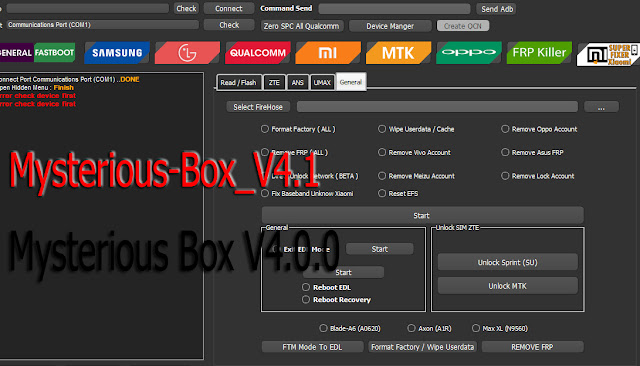
Mysterious Box V4.0.0

Mysterious Box V4.1

Free Download


All samsung FRP Bypass Tool 2021 | Realme Oppo Pattern Unlock Huawei,Xiaomi,VIVO | Star Mobile Care Mysterious Box V4.0.0 Tool Free without Box


All samsung Frp Bypass tool 2021 Frp Mi Account Unlock Tool 2021 Huawei FRP bypass Huawei frp tool 2021 Huawei frp unlock tool oppo frp unlock tool 2021 oppo pattern unlock tool oppo pattern unlock tool 2021 Oppo Realme Unlock Tool 2021 realme pattern unlock tool realme pattern unlock tool 2021 realme unlock tool samsung frp bypass 2021 samsung frp bypass tool Samsung Frp Tool 2021 samsung frp unlock tool star mobile care vivo unlock tool vivo Unlock tool 2021

Thursday, June 24, 2021

falcon box crack without box Free Download

falcon box crack without box Free Download

Falcon Box crack has been a very reliable tool for fixing HTC, BlackBerry, Huawei, Samsung, Qualcomm, ZTE, LG, and many other popular brands. In day to day usage, the smartphone user may experience a lot of problems. Especially, the software issue is a massive problem these days. The Falcon box can always fix some issues. But you need to install the driver on your computer. So, today we are going to talk about the Falcon box. 


Sunday, June 20, 2021

Android; Miko; Service FRP tool Samsung ,Xiaomi, Huawei, Oppo vivo, MTK, Crack, Free, Doiwnload


Android; Miko; Service FRP tool Samsung ,Xiaomi, Huawei, Oppo vivo, MTK, Crack, Free, Doiwnload


Tool Download:: Link


Tool Download:: Link

 Android Miko Service tool 2021 Percentage-tested equipment for MediaTek phones All MediaTek FRP Removal. Formatting and Screen Lock Removal, and Manual Hard Reset, Android Mico Service Tools It is mainly used for mobile repair through computers and laptops, and it is the latest update tool 2021.


Android phones usually use the Phone's screen lock. Unfortunately forget the phone's screen lock requires manual formatting of the Phones Each Mobile has its security options. Such as FRP from Google, which is used as the security of the locked Mobile, so once the Phone is formatted manually, you have to re-setup the FRP. Manual FRP Setup In this Case it is not possible to set up due to forgetting the account. Android Miko Service tool. And Can be used for all the phones which Cannot be, reset Manually. FRP locks.

MICO Service Tool 2021 How to use? and how to Downloading in this blog

Android Mico Service Tools 2021

Android Miko Service tool 2021 This tool is used to repair all MediaTek smartphones and format FRP screen locks. MediaTek phones include Oppo, Vivo, Xiaomi, and all other MediaTek devices with one-click screen lock, FRT removal, and removal. It is a huge store for downloading Miko service tools. Here are all the tools of sophisticated smartphones.

Different tools for each phone can Be, collected from this store. It contains constantly updated applications, tools, flash files, stock ROMs, custom ROMs. And all the app applications needed for phone repair. From here every tool Can be easily downloaded, as per the requirement of the visitors. So in that case. The tools should be used, keeping in mind the clear idea of ​​every subject. Every Android smartphone has different features, so the software must be downloaded and used according to the model of the phone.


Unfortunately in case, of forgetting the screen lock of the phone, It is not possible. To use the Phone immediately which case steps have to be taken to remove the screen lock. Of the phone, so keeping these issues in mind, the tool developer has designed sophisticated Android Mico service tools. Using this tool, the screen lock of each phone can be removed and flushed, and formatted with one click. A clearer idea can be found from each discussion of the Article, to get a clearer idea about the Android Miko Service tool.

Tool Features:-

  • Backup or Restore
  • Remove MI account
  • Fast boot Unlock
  • MTK Flasher
  • QCN Read and Write
  • QUALCOMM Firmware Read
  • QUALCOMM Phones Flashing- FRP -Formatting
  • OPPO- VIVO- MI-HUAWEI- Samsung FRP 
  • EMMC Read and Write Erase

File Name:- Miko Service tool 2021 Original 


Supporting Devices

Android Miko Service Tool Allows users to remove the Xiaomi Account using the 9008 methods. It supports Redmi Note 6 Pro, Xiaomi Redmi Note 7s, Pro, Redmi 4A, Redmi 4X, Redmi 3, Redmi 4 Pro, Xiaomi Note Pro, Xiaomi Mi Max, Xiaomi Mi Max 32 GB, Xiaomi Mi 4, Xiaomi Mi 4C, Redmi 4A, Xiaomi Mi5, Xiaomi Mi Note LTE, Redmi 3S, Redmi 3X, Xiaomi Mi 4S, Xiaomi Mi Max 64 GB.

Special caution:

We never support the use of duplicate and piracy software. So this is because duplicate and modified software can cause various virus problems. And computer laptops can cause internal problems, so refrain from using modified and cracked software. And it is best not to use any pirated ones.

So always use original applications and original software. Can be collected from official sites. We share every original software, firmware, stock ROM, custom ROM for the convenience of the visitors. In that case, we first use each file ourselves and try to share it with the visitors with 100% certainty.

More Info

Before using any tools or software, you must have a clear idea about the software. In that case, you can get the idea from the Tools and software-related tutorials to get a more about clear idea. alltips24 usually provides updated video tutorials on all software and tools via YouTube.

Dear visitor: 

"Android Miko Service tool

Thank you so much for visiting the blog regularly because we increase the help for the visitors, in which case every visitor has the opportunity to express their opinion here. Comments can be shared through comments as needed. Each visitor's comment is a replay with Special importance. Your feedback on tools, firmware, flash files, custom, and every other post can be expressed in the comments box, in which case we will try to replay with Special importance. Thank you

Software Version 2 0 0 0 38 Tool Crack Free Download

 Software Version 2 0 0 0 38 Tool Crack Free Download


 Software Version 2 0 0 0 38 Tool  

Xtool software version 2.0.0.0.385 crack is a small tool for windows computer and it is crack by a secret person I don't know. the crack is working without any activation or buy any licence or box/dongle is fully working. the tool helps you to Remove Security lock from Xiaomi, Huawei, Motorola, Nokia. it also supports multiple operations on all those smartphones. I have described all function below, you can check it and enjoy the crack.

Saturday, June 19, 2021

Hell.Tool v3.0 Crack Samsung unlock Free Download

 Hell.Tool v3.0 Crack Samsung unlock Free Download

 Hell Tool v3.0 is a small windows computer application created by The Hell Team. It will allow you to Manage The Partition, Reboot Recovery, App Manager, Reboot Fastboot, Reboot Download Mode, Reboot EDL


You can also remove the Lock Screen, Enable USB debugging, Open Settings on your smartphone device, Enable Developer Option, Enable the Installation of the apps from an unknown source, Backup the Smartphone devices, Flash File By Sideload.

You can also Restore Backup of the android mobile device, Fix Factory Mode, Factory Reset Android Device, Reset Google Account, Bypass and Reset FRP Protection, Language Changer, IMEI Repairing.
You can Also Perform various tasks in Fastboot Mode, including reading Device Info, Wipe cache, Wipe Data, Reboot the Device, Reset FRP Protection, Reboot EDL Mode, Force Reboot EDL, Exit Fastboot, Reboot Bootloader, Unlock Bootloader.

Package Name: Hell Tool v3.0 (TechnicalMicky.CoM).rar
Package Password: www.TechnicalMicky.com
Package Version: 3.0
Package Size: 19.6MB
 

 Hell.Tool v3.0 Crack